How to use a custom font in Squarespace without code
Squarespace just released a brand-new feature that finally lets you upload custom fonts directly into your site. No more workarounds or buried settings to track down!
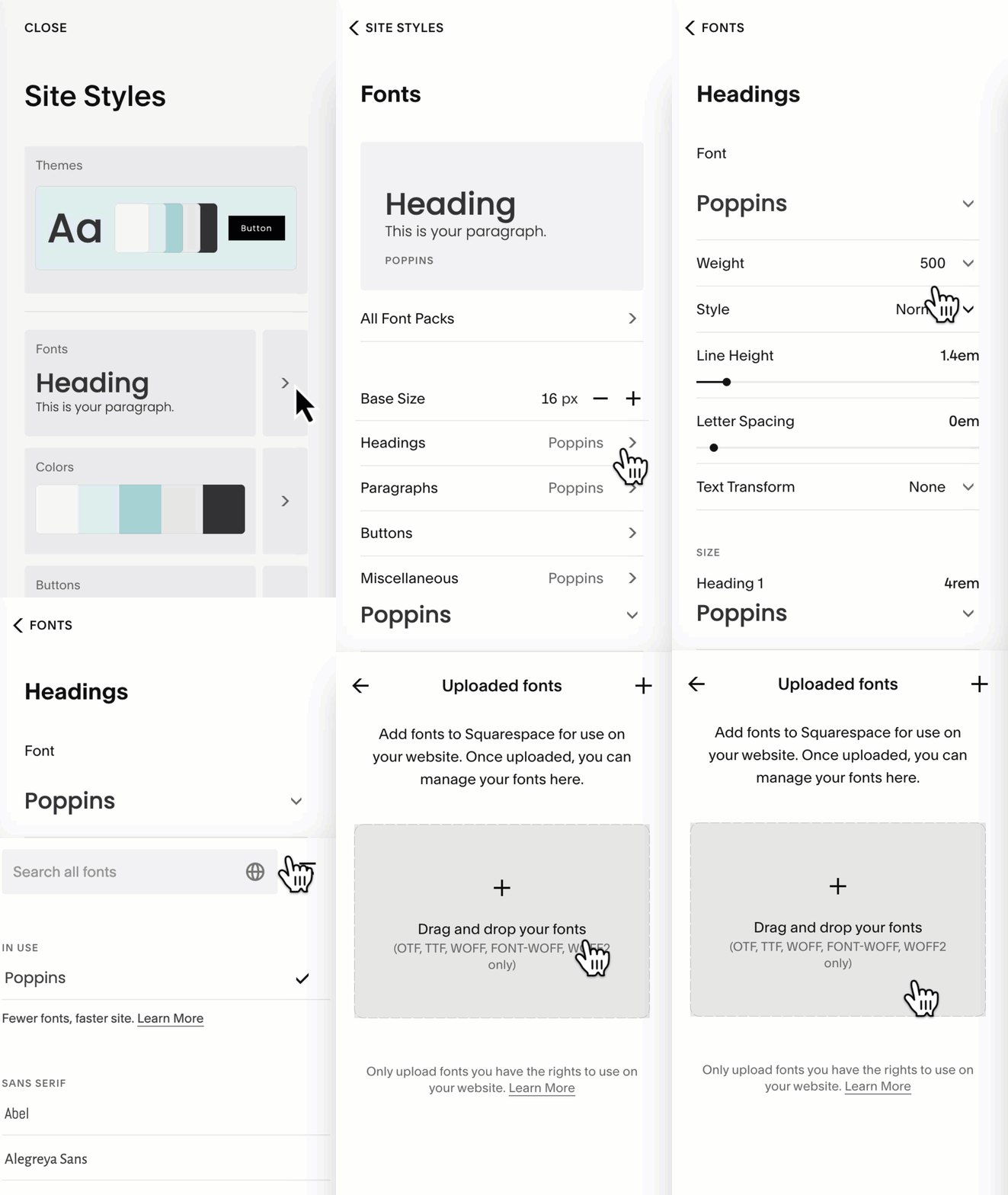
Inside your Site Style menu, open your Fonts panel, the click on a font type like Headings.
Select the font family, and you’ll now see an Uploaded Fonts section where you can add your own font file.
Accepted Font Formats in Squarespace
If you want to add your custom font to something accessible via the advanced font menu inside site styles, make sure you upload the right kind of file. Squarespace snow upports the following font file types:
.otf (OpenType)
.ttf (TrueType)
.woff (Web Open Font Format)
.woff2 (The recommended modern, compressed format)
Pro Tips
If you have multiple versions of your font, upload .woff2 first; it’s the fastest and widely considered most web-friendly for different devices.
This is not legal advice BUT I strongly recommend making sure you have a proper commercial-use license for any font you upload. Even “free” fonts can still require a paid license for business use, which can include your websites. Always double check the license terms. Fonts known as open source are generally free to use anywhere, but it’s always good to double check!
My Favorite Places to Get Web-Safe, Licensed Fonts
If you're building a brand look you love, these are my go-to resources:
Google Fonts — totally free open-source, huge library, perfect for Squarespace
Creative Market — premium fonts with clear commercial licensing
Where Custom CSS Still Matters
Squarespace’s new font uploader is amazing, but if you want to use your uploaded font for anything outside the Advanced Font menu (like specific buttons, product areas, gallery titles, custom sections, etc), you’ll still need to add a little CSS to specify where that font should appear. This older tutorial of mine below can help with the DIY technique, and of course, you can always ask Custom Codey for step-by-step support and to create the code for you if you’re not sure what selectors you need to use.
